


ScanNow Home
4.2425.00 Reviews
App Specs
- Version
- 1.5.12
- Updated On
- License
- Free
- Downloads
- 1,000,000+
- Developer
- Homescreen Apps
- Categories
- Productivity
- Platform
- Android
Screenshots
 Analysis by AppCompare
Paperwork tends to become a problem at the least convenient moment: a receipt is needed after checkout, a signed page has to be sent before you leave, or a QR code is buried in a photo. I judge a phone scanner by whether it makes those small tasks quicker without creating a new chore. ScanNow Home is a free productivity app from Homescreen Apps that brings scanning and file conversion together with photo, lottery and QR-code tools. That broad mix is useful when you want one place to start, though it also means it is worth thinking about which parts you will actually use.
What the app is trying to simplify
The appeal here is practical rather than elaborate: keep a scanner close at hand, turn paper into a file, and avoid searching for a separate utility every time a different kind of scan comes up. The app’s “one swipe away” idea suits quick jobs, especially when the alternative is opening a general camera app, taking a picture, then working out how to crop, convert or share it somewhere else.
That convenience matters most for occasional tasks. If you only scan a document once in a while, a dedicated office scanner may be excessive; if you scan constantly, a more specialised document-management setup may offer stronger controls. I see ScanNow Home as a middle ground for people who want everyday capture and conversion close by, rather than a full filing system.
Getting Started with ScanNow Home
First things first, let’s talk about getting this app up and running. Downloading ScanNow Home from either the Android or iOS store is a breeze. Once installed, it greets you with a clean and intuitive interface. No need to be a tech wizard here; the app is designed to be user-friendly, making it super easy to navigate even for the less tech-savvy among us.
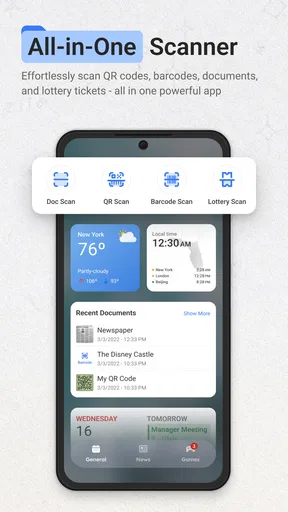
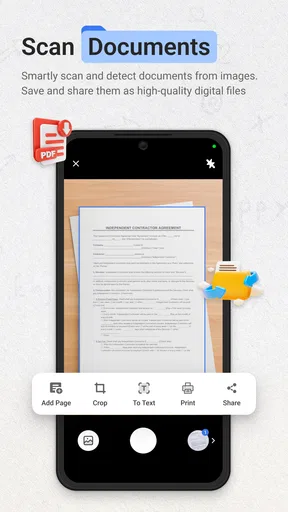
After firing it up, you’re met with a simple home screen that gives you all the options without overwhelming you with unnecessary clutter. The main feature is, of course, the scanning capability. Using your phone's camera, you can quickly scan documents, receipts, or even those random notes scribbled on napkins. Just point, shoot, and voilà—your document is digitized.
Making the first scan useful
A good result depends as much on the paper as on the app. For a receipt or form, I’d place it on a flat, contrasting surface, keep the phone parallel to the page, and check that all four edges are visible before capturing. That small bit of care reduces the chance of a skewed page or a shadow hiding a line. It is especially worthwhile for text that OCR needs to interpret.
For a multi-page document, I’d decide on the destination and naming scheme before scanning rather than leave a batch of files with vague names. A clear label such as a date and document purpose makes a later search much easier. If the scan is only needed for a quick email, a compact PDF is usually a sensible choice; if I need to reuse a particular image, keeping a picture format may be more convenient. The best format depends on what happens next, not simply on which option sounds most versatile.
Worth Reading Before You Choose

EA SPORTS FC Mobile 26 Is a Bigger Football Game, but It Takes Time

Flipboard Shows What News Apps Must Do Beyond the Feed

Switching to Android Auto Means Rethinking Your Driving Routine

Google Calendar Makes a Crowded Week Easier to Manage

Ludo King Makes the Most of the Minutes Between Plans

Baby Panda World Brings Quick Play to Modern Phones, but Its Game Library Feels Busy
Features That Stand Out
What really caught my eye with this app is its ability to recognize text through OCR (Optical Character Recognition). This means you can convert those scanned images into editable and searchable text. It's like a digital magic trick that feels incredibly useful, especially when you're looking to declutter your desk or need to find something in a pinch.
OCR is most helpful when the original is clean, well lit and printed in a straightforward typeface. I wouldn’t treat it as a guarantee that every digit or name has been captured correctly: a faint receipt, handwriting or a fold through a line can all make text recognition less dependable. For a reimbursement form or a reference note, I’d scan first, then check important details before relying on the recognized text. That quick proofread is a better trade-off than discovering an incorrect amount after sending the file.
Another cool feature is the ability to save your scans in multiple formats, like PDF or JPG, and easily share them via email or any of your favorite apps. The seamless integration with cloud services like Google Drive and Dropbox is also a big plus, allowing you to keep your documents accessible and organized without taking up precious phone storage.
Sharing is where a scanner becomes useful beyond the moment of capture. For a form that needs a signature, I’d check the exported file on the phone before sending it, making sure the page is legible and not cropped. For a receipt, a photo format may be enough if the recipient just needs to see it; a PDF is easier to treat as a document when several pages belong together. I would also avoid assuming that a scan has reached a cloud folder until I have confirmed it there, particularly when I am about to delete the local copy.
Daily situations where it earns a place
Imagine getting home after a workday with a paper receipt needed for an expense claim, a school notice that should be shared with another family member, and a QR code on a leaflet you want to inspect. Instead of leaving all three on the kitchen counter, I could use one app to capture the paper items and handle the code-related task, then send the document to the appropriate destination while the details are still fresh. The time saved is modest on any single day, but removing several little steps makes it easier to keep up with the paperwork.
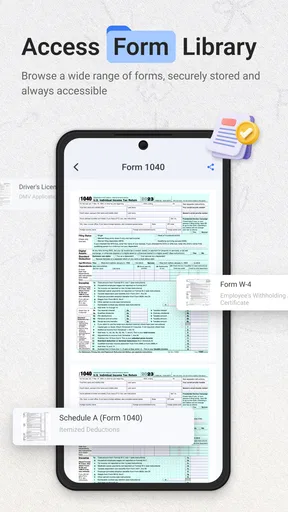
Students can use a phone scanner to keep a handout or a page of notes available when a physical copy is inconvenient. Freelancers and people working from home may find receipt capture useful before small purchases get mixed together. At home, a scanned instruction sheet or appointment document can be easier to retrieve than a folder of loose papers. In each case, the useful habit is to name and sort the file immediately; digitising without a retrieval plan simply moves the clutter from a desk to a camera roll or downloads folder.
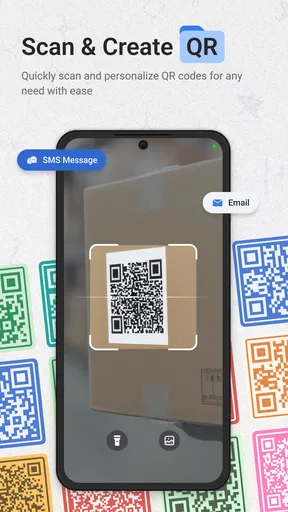
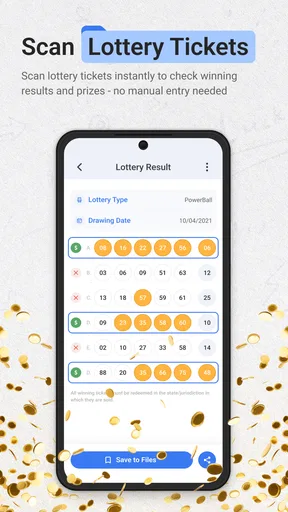
The extra QR and lottery scanning angle may appeal to someone who regularly encounters those items and prefers not to switch tools. It is less compelling if you only scan documents and already have a QR reader built into your phone’s camera. In that situation, the broader set of tools is convenient but not a reason by itself to replace an app you already trust.
Performance and Usability
Let’s be real, no one wants an app that’s going to crash every time you try to use it, right? Luckily, ScanNow Home delivers a smooth performance. Scanning is quick, and the app processes the images faster than you can say "paperless." The quality of the scans is notably sharp, capturing even the tiniest details with impressive clarity.
Navigating the app feels intuitive. Thanks to its minimalist design, you don't have to dig through menus to find what you need. The app’s layout is straightforward, making it a joy to use, whether you're a student, professional, or someone just trying to keep their paperwork in order.
The main trade-off in a broad utility like this is depth versus speed. A phone-first workflow can be handy for a few pages, while a flatbed scanner or a dedicated office machine is a better fit for large stacks, bound books or work that needs highly consistent reproduction. Likewise, someone who needs a carefully structured archive may prefer a specialised document manager. ScanNow Home makes more sense when convenience is the priority and a phone is already in your hand.
It is also worth checking the final file rather than judging only the live camera view. A page can look clear on screen yet have a clipped margin or a faint edge once saved. I’d build in a brief review before sharing anything important, and keep the paper original when a legal, financial or administrative process requires it. A digital scan is a useful working copy, but it should not automatically be treated as a replacement for every original.
Who will get the most from it
I’d recommend it to people who scan now and then, want common conversion and capture tasks close together, and prefer a straightforward phone workflow over a larger desktop setup. Its free price makes trying it an easy decision for a casual user, and its Everyone age rating suits a broad audience. The app has an average rating of 4.4 from around 4,200 ratings, with over a million installs; that gives a useful sense of its reach, but your own needs still matter more than popularity.
On the other hand, I would skip it if your work depends on a strict document archive, advanced batch handling, or a scanner connected to a formal office process. I’d also choose a different tool if you already have a dependable scanner built into your phone’s operating system and only need basic page capture. The best choice is the one that fits your routine, not the one with the longest feature list.
Security and Privacy
In this digital age, we can't ignore the importance of privacy. Thankfully, ScanNow Home takes this seriously. It provides options to password-protect your documents, which is a reassuring feature if you're dealing with sensitive information. Knowing that your documents are secure gives you peace of mind, especially when you're working on the go.
Password protection can be a useful extra barrier, but I would still treat sensitive files carefully throughout the whole workflow. Think about where a scan is saved, which sharing destination you choose, and whether the recipient needs the complete document or only a page. For identity, health or financial paperwork, it is sensible to avoid sending a file through a casual channel and to confirm the protected copy is the one being shared. A lock on a document helps, but it does not remove the need to make deliberate choices.
One practical question is whether the app is suitable for keeping every paper record permanently. I would use it for convenient digital copies and quick access, while retaining important originals when they may be needed later. Another is whether OCR eliminates manual checking; it does not. I’d use recognized text as a time-saver, then verify names, dates and amounts before acting on them. And if the goal is simply to read a QR code, the phone’s built-in camera may already be enough, so there is no need to add another step unless having the tools together is genuinely useful.
Final Thoughts
Overall, ScanNow Home is a nifty little app that punches above its weight. It combines functionality with ease of use, making it a must-have for anyone looking to streamline their document management. Whether you’re scanning receipts for expense reports or digitizing old photos, this app has got your back.
It’s not just about going paperless; it’s about making your life easier. And isn’t that what technology should be all about? So, if you’re ready to step up your organization game, give ScanNow Home a try. You might just find yourself wondering how you ever lived without it.
Homescreen Apps’ app is at version 1.4.5 and supports devices running Android 9 or later. Those details are useful when deciding whether it fits an older phone, while the free entry point makes it straightforward to test a real workflow before relying on it. I would begin with one non-sensitive receipt or form, try the export and sharing steps, and see whether the result is easy to find again. If that small trial saves time without adding confusion, it is a good sign the app suits your everyday routine.
My bottom line is that this is best treated as a handy pocket utility, not a complete replacement for a careful filing system or a dedicated scanner. It earns its place when quick capture, readable exports and a few extra scan-related tools reduce the friction of ordinary errands. If you need specialised archival controls or regularly process large volumes, another solution will serve you better. For everyone else who wants paper details available when they need them, ScanNow Home is an approachable option worth trying.
Pros
- Intuitive user interface
- easy to navigate.
- Fast scanning with accurate results.
- Supports multiple file formats.
- Seamless cloud integration for backups.
- Regular updates and improvements.
Cons
- Limited free version features.
- Occasional ads in free version.
- Requires internet for some features.
- Can drain battery quickly during use.
- Subscription needed for advanced features.
FAQs for ScanNow Home
What is ScanNow Home, and how does it work?
ScanNow Home is a mobile application designed to help users quickly scan documents, receipts, and other paper items using their smartphone camera. By leveraging advanced image processing technology, the app automatically enhances scans for clarity and converts them into PDF or JPEG formats, which can be easily saved or shared.
Is ScanNow Home available for both Android and iOS devices?
Yes, ScanNow Home is available for both Android and iOS platforms. Users can download the app from the Google Play Store for Android devices or the Apple App Store for iOS devices. The app is optimized for a seamless user experience on both operating systems, ensuring compatibility and performance.
Does ScanNow Home require an internet connection to function?
No, ScanNow Home does not require an internet connection for basic scanning functions. Users can capture and save scans offline. However, an internet connection might be necessary for certain features, such as cloud storage integration or sharing files via email or social media platforms.
Are there any in-app purchases or subscription fees within ScanNow Home?
ScanNow Home offers a free version with basic features suitable for everyday scanning needs. For more advanced features like OCR text recognition, cloud storage integration, or unlimited scans, users might consider subscribing to a premium plan. The app provides clear information about any costs involved before upgrading.
What security measures does ScanNow Home take to protect my scanned documents?
ScanNow Home prioritizes user privacy and security by implementing encryption protocols for storing and sharing documents. The app ensures that scanned files are saved securely on your device or chosen cloud service. Additionally, any data shared online is protected with end-to-end encryption to prevent unauthorized access.


